There is a version of “no backend” that means someone else’s backend. This is the other one. By the end of the first lesson a real SQL engine is running in your browser tab, and by the end of the ninth it holds twenty thousand rows in private storage, answers analytical queries in single-digit milliseconds, and shows you its own execution plans. No server is involved at any point.
DuckDB is a columnar analytical database — the kind of engine that lives behind a dashboard — and it compiles to WebAssembly. That combination is stranger than it sounds. The queries you would normally send across a network run against data the browser already has, which changes what an interface is allowed to do: filtering stops being a request and becomes a keystroke.
The engine you’ll have running
A complete data layer for a sales analytics app, and a plain console to drive
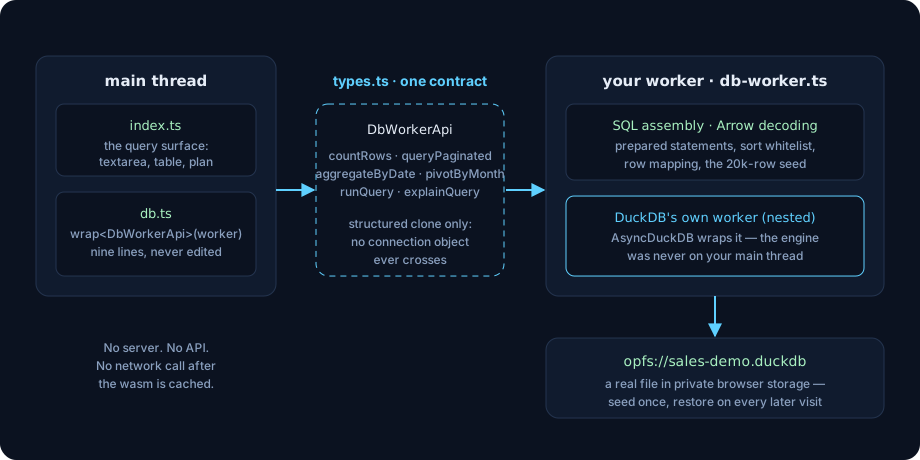
it. Twenty thousand rows seeded once into an OPFS database file and restored on
every later visit. Every query bound through prepared statements. Pagination
that costs the same whether one item is selected or eight. A seven-day moving
average computed by a window function in a single pass, a month-by-item PIVOT,
and a query console where you can type your own SQL, read DuckDB’s parser errors
verbatim, and profile any statement with EXPLAIN ANALYZE.
The interface is deliberately plain — a textarea, a button, an unstyled table. Nine lessons is not long enough to build a dashboard and teach a database engine, and pretending otherwise is how tutorials end up teaching neither. The dashboard course picks up this exact code and builds the real interface on it.
Nine lessons, nine tags
Every lesson ends at an annotated tag in the
companion repository,
engine-01 through engine-09. Check out a tag to see the code exactly as it
stands at that point, or diff two consecutive tags to read one lesson’s complete
answer key. Every tag builds and typechecks from a clean npm ci.
- A SQL engine in a browser tab — Vite, strict TypeScript, and the bundle table that decides which build of DuckDB your browser gets.
- Move the database off the main thread — the correction to the obvious assumption, and one typed contract in front of two workers.
- A table and 20,000 rows — one
INSERTwith twenty thousand tuples, and exactly when that would be indefensible. - Persistence — an OPFS database file, an in-memory fallback, and a reload that costs nothing.
- Prepared statements — bound parameters, and a variable-length
INlist built from placeholders instead of values. - Pagination that stays constant —
LIMIT/OFFSETin the engine, whyORDER BYcannot be bound, and normalizing Arrow’s dates. - Aggregates and window functions —
AVG(SUM(amount)) OVER (…), which reads like a mistake until you see the two stages. PIVOT, and where parameters stop working — a query that needs its column names before it can be planned.- A query surface of your own — free-form SQL, errors as values, and
EXPLAIN ANALYZE.
The part most tutorials skip
Three lessons here exist because the obvious version is wrong.
Lesson 2 is the clearest case. Moving a database into a web worker is standard advice, and the standard reason given for it — “so the engine doesn’t block the main thread” — is already false before you start: DuckDB constructs itself around its own worker. What is still on your main thread is your code, and that is what lesson 2 actually moves. You end up with two workers and a reason to know why.
Lesson 6 is the one that costs people a rewrite. ORDER BY cannot be a bound
parameter — the planner needs the column before values exist — so the sort
column has to pass through a whitelist. Lesson 8 is the same shape one level up:
PIVOT needs its output columns named before it can run, which means the month
list cannot come from a parameter either, and has to be derived from something
you already trust.
Who ends up glad they took it
Frontend engineers who have wired one too many dashboards to a /api/summary
endpoint that returns pre-chewed numbers, and want to know what it costs to hold
the data instead. Data people who write good SQL and want it running somewhere
a browser can reach without a server in between. Anyone who has read that
WebAssembly is fast and would like a concrete thing to point at.
You do not need to have used DuckDB, a web worker, or OPFS before. You do need to be comfortable reading TypeScript, because every line of this is typed.
Where it goes next
The dashboard course takes this data layer — unchanged, not one line edited — and builds the interface: a signals store, a debounced query runner, twelve Lit web components, D3 charts inside shadow roots, and a design system that recolors from a single slider. The two courses are one codebase and one git history.